Parties & EXP Share
Parties & EXP Share
A Party in Trickster is a group of two or more characters that join together for various reasons. The most common reason people party is for an EXP and TM boost, to do Monster Party Quests which net more experience/better rewards than doing solo Monster Quests, or powerleveling characters.
General Info
Why party?
- Fight strong monsters together — everyone can focus the same target.
- Pick up loot dropped by monsters your teammates defeat.
- Great for EXP/TM boosts, Monster Party Quests, and powerleveling.
Party size and boosts
Minimum 2, maximum 6 members. EXP and TM boosts depend on member count, party type, and gender/class composition. Review Types of Parties and Party Multipliers to plan the best setup.
Helpful tip
How To Make or Join A Party
Invite directly
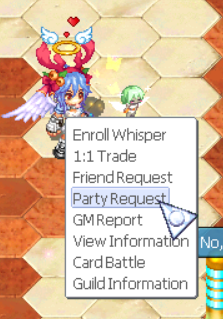
- Right‑click the player and choose Party Request.
- They receive a notification with party info: average level, party type, members, EXP Share, and Item Share.
- They accept or reject the request.
Party Bulletin Board
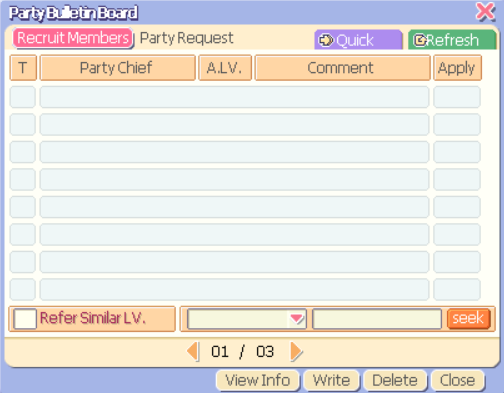
- Open Party (bottom of the screen) or press P.
- Open the Party Bulletin Board and create a listing.
- Interested players click your listing and send an application.
Party Simulator
Configure members and see the party type and boosts instantly.
Types of Parties
Party types change automatically when the requirements are met.
-
NormalNormal Party
BeginnerBeginner Party
TypeType Party
RoyalRoyal Party
SpecialSpecial Party
FixedFixed Party
Normal Party
- Default party with no special requirements.
- Does not fulfill other party requirements (e.g., all same type, each class present, or same gender).
- Worst EXP/TM boosts out of all parties, except Fixed.
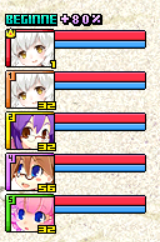
Beginner Party
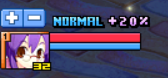
- Requires ≥1 member at level ≤30.
- No member gap of 100+ levels (otherwise becomes Fixed).
- Better boosts than Normal or Type (at 4 members), but limited by the ≤30 member.
- Royal/Special give better boosts; Type surpasses after 4 members.
Type Party
- Requires ≥4 members of the same type; all above level 30.
- Better EXP/TM boosts than Normal/Beginner (past 4 members).
- Less boosts than Royal or Special.

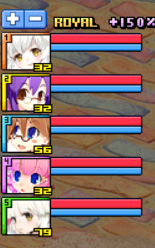
Royal Party
- Requires ≥4 members, with ≥1 from each class (Power, Magic, Sense, Charm).
- All characters above level 30; multiples per class are fine.
- EXP/TM boosts equal to Special — the strongest boosts available.
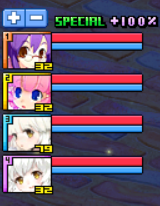
Special Party
- Requires ≥4 members, all same gender.
- If someone of the other gender joins, it changes to Normal or Royal depending on requirements now met.
- EXP/TM boosts equal to Royal — the strongest boosts available.
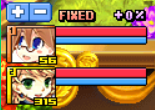
Fixed Party
- Triggered when a member has ≥100 level difference to the Party Chief.
- Provides no EXP/TM boosts and does not allow EXP sharing (overrides Beginner).
- Generally not useful: no boosts and no powerleveling via sharing.
Party Multipliers
- Values show EXP and TM boosts for each party type at the given member count.
- As a general rule, the more members in your party, the higher the EXP and TM boosts. (Unless you are in a Fixed party).
- Royal parties and Special party's EXP and TM boosts are equal, and both give the most powerful EXP and TM boosts you can get in parties.
- Fixed party provides no EXP or TM boosts and does not allow EXP sharing.
- Normal EXP +20x / TM +20x
- Beginner EXP +30x / TM +30x
- Type EXP +20x / TM +20x
- Royal EXP +30x / TM +50x
- Special EXP +30x / TM +50x
- Fixed None
- Normal EXP +30x / TM +30x
- Beginner EXP +40x / TM +50x
- Type EXP +40x / TM +40x
- Royal EXP +50x / TM +50x
- Special EXP +50x / TM +50x
- Fixed None
- Normal EXP +30x / TM +30x
- Beginner EXP +40x / TM +50x
- Type EXP +40x / TM +40x
- Royal EXP +50x / TM +50x
- Special EXP +50x / TM +50x
- Fixed None
- Normal EXP +40x / TM +50x
- Beginner EXP +60x / TM +80x
- Type EXP +70x / TM +100x
- Royal EXP +100x / TM +150x
- Special EXP +100x / TM +150x
- Fixed None
- Normal EXP +50x / TM +80x
- Beginner EXP +80x / TM +100x
- Type EXP +100x / TM +150x
- Royal EXP +150x / TM +200x
- Special EXP +150x / TM +200x
- Fixed None
Party Settings
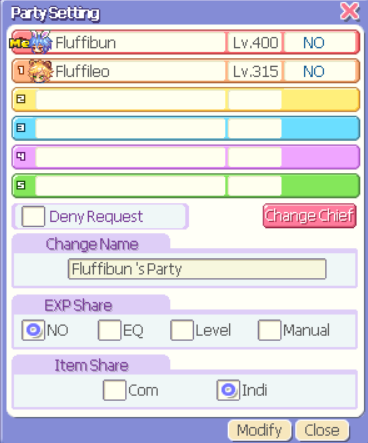
Only the Party Chief can edit settings. To view them, open Party (bottom of the screen) or press P, then click Setting Information.
🔕 Deny Request
Other people will not be able to join your party through requesting.
👑 Change Chief
Choose who will become Party Chief out of those in your party.
✏️ Change Name
Change the name of your party.
🎒 Item Share
Change whether people in your party can pick up other party member's loot or not.
COM — Communal
Loot can be picked up communally across the party.
INDI — Individual
Drops are individual per party member, behaving as if not in a party.
⚖️ EXP Share
You can determine how much experience is shared in the party. For example, if the EXP Share is 25%, when you kill a monster 25% of that EXP will go to the other member. People generally turn this feature to NO, unless powerleveling. This allows you to get the boosts from being in the party while keeping all of your EXP.
EQ — Equal Share
EXP is split equally among party members.
Level — Level-based Share
EXP distribution is based on the level of characters in your party; higher levelled characters earn more.
Manual — Custom Share
Set the share amount yourself (within allowed constraints).
NO — No EXP Share
Recommended unless powerleveling; keeps all EXP on the killer while still getting party boosts.
Cancelling, Leaving or Kicking Someone From a Party
✂ Kick a member
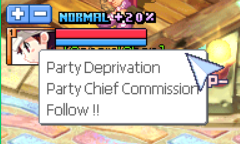
Right‑click their avatar, or open the Party tab and press Del, then click the character.
❌ Cancel the party
Open the Party tab and press Clr.
🚪 Quit the Party
If you are not the Party Chief, open the Party tab and select Quit the Party.