The Eternal Paula website has a few features on it that are otherwise unavailable without login.
Account
Recharge: Pay real life money for MyShop points
Guild: Join/manage/view a guild
Change password: Self-explanatory
Game
Disconnect Acc. : Disconnects your character, good if you accidentally get kicked off the client and it says in your launcher that you are already signed in to the game still
Move Character: Moves your character back to Cora; good if you’re on a map that is overfilled or bugged (shows “Move to main menu” or “Exit Game” Esc. screen but not the Continue button; won’t load the whole map; etc.) and need to get out
Move Storage Items: Moves 10 items from your Lisa Bank to your inventory; used when you activate the storage bug by having too many items in your bank for a self-fix; MAKE SURE TO HAVE AT LEAST 11 SLOTS IN YOUR INVENTORY!!!
Market
Buy MyShop: Spend galder to buy myshop points (must have the galder in the website Bank!)
Buy Galders: Spend MyShop to buy galder (galder goes to your website Bank)
Create Listing: Self-explanatory
History: View your past transactions
Bank: Website-based galder storage, specifically for Market Transactions
How to pay with MS for an ingame item (MS trade):
This is very odd to explain so please pay attention.
Say you are buying a Heart Face Paint from someone for 5k MS (not its real price dw); AKA you are giving someone 5k MS for an ingame item
Make sure to get a screenshot of confirmation that you will get this item for the myshop points, in case something goes wrong!
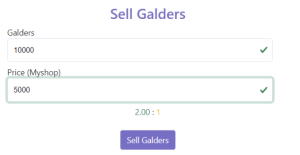
The person that has the Heart Face Paint (MS recipient) goes to Market > Bank with their character OFFLINE and deposits 10,000 galder, then goes to Market > Create ListingMS Recipient (Person with Heart Face Paint)'s example GALDER sale listing.MS Recipient (person with Heart Face Paint) lists a GALDER listing for 10,000 galder (no comma) and 5,000 MS (See image to the right)
That same person goes to Market >Buy Galder and takes a picture of their listing with their IGN blocked out where you (the buyer of the item/seller of MS) are to “buy” the galder, or shows the listing under the Create Listing header where they can delete it
You, the buyer of the item/seller of MS go to Market > Buy Galder and buy the listing that the MS recipient posted with your character OFFLINE
You have successfully paid in MS!
QoL
NPC Drills: LOG OFF FIRST!!! Allows you to sell all drills in your inventory with 0 life other than flicker drills
Event
Rotates based on event. You’ll see it mentioned in the patchnotes.