Hologramsie: Difference between revisions
Jump to navigation
Jump to search
No edit summary |
No edit summary |
||
| Line 1: | Line 1: | ||
< | <html> | ||
<div class="hero- | <html lang="en" id="top"> | ||
<h1 class="hero-title">Hologramsie</h1> | <head> | ||
<div class=" | <meta charset="UTF-8" /> | ||
</div> | <meta name="viewport" content="width=device-width, initial-scale=1" /> | ||
</div> | <title>CoraTO Wiki • Hologramsie</title> | ||
</head> | |||
<body> | |||
<div class="mw-page-scope"> | |||
<!-- Hero --> | |||
<header class="hero"> | |||
<div class="hero-inner"> | |||
<div class="hero-logo">[[File:Hologramsie.png|center|220x220px]]</div> | |||
<h1 class="hero-title">Hologramsie</h1> | |||
<div class="status-pill">Central Multi-Function Staff NPC</div> | |||
</div> | |||
</header> | |||
<nav class="nav-tabs" role="tablist" aria-label="Main sections"> | |||
<button id="tabbtn-overview" class="nav-tab active" role="tab" aria-selected="true" aria-controls="tab-overview" data-tab="tab-overview" tabindex="0"><span class="full-text">Overview</span><span class="short-text">Overview</span></button> | |||
<button id="tabbtn-services" class="nav-tab" role="tab" aria-selected="false" aria-controls="tab-services" data-tab="tab-services" tabindex="-1"><span class="full-text">Functions</span><span class="short-text">Functions</span></button> | |||
<button id="tabbtn-locations" class="nav-tab" role="tab" aria-selected="false" aria-controls="tab-locations" data-tab="tab-locations" tabindex="-1"><span class="full-text">Locations</span><span class="short-text">Locations</span></button> | |||
<button id="tabbtn-towers" class="nav-tab" role="tab" aria-selected="false" aria-controls="tab-towers" data-tab="tab-towers" tabindex="-1"><span class="full-text">Towers</span><span class="short-text">Towers</span></button> | |||
</nav> | |||
<main class="content"> | |||
<!-- OVERVIEW TAB --> | |||
<section id="tab-overview" class="tab-content active" role="tabpanel" aria-labelledby="tab-overview-label"> | |||
<div class="section-header"> | |||
<h2 id="quick-overview">Quick Overview</h2> | |||
<p class="section-lead">A centralized hub that consolidates common NPC services</p> | |||
</div> | |||
<div class="changelog-with-image"> | |||
<div class="changelog-box"> | |||
<strong>About Hologramsie:</strong> Hologramsie is a versatile Staff NPC based on GM Mewsie, designed to serve as a centralized hub for multiple game functions. This NPC consolidates various services that would normally require visiting different NPCs across the game world. | |||
</div> | |||
<div class="image-container"> | |||
<img src="https://mewsie.world/CoraTOWiki/images/7/7c/Hologramsie.png" alt="Hologramsie NPC" > | |||
<strong>Hologramsie</strong><p class="image-caption">Multi-Function Staff NPC</p> | |||
</div> | |||
</div> | |||
</div> | |||
<p>Hologramsie provides comprehensive services including:</p> | |||
<div class="destaques-grid"> | |||
<div class="destaque-card" data-tab-trigger="tab-services" data-tab-button="tabbtn-services" data-scroll-to="banking-services"> | |||
<div class="destaque-image"> | |||
<img src="data:image/svg+xml,%3Csvg xmlns='http://www.w3.org/2000/svg' viewBox='0 0 100 100'%3E%3Crect width='100' height='100' fill='%23e3f2fd'/%3E%3Ctext x='50' y='50' text-anchor='middle' dominant-baseline='middle' font-family='Arial' font-size='12' fill='%231976d2'%3EBanking%3C/text%3E%3C/svg%3E" alt="Banking Services"> | |||
</div> | |||
<div class="destaque-text"> | |||
<h3>Banking Services</h3> | |||
<p>Multipaged Bank, Galder Bank, and Timed Item Recharge</p> | |||
</div> | |||
</div> | |||
<div class="destaque-card" data-tab-trigger="tab-services" data-tab-button="tabbtn-services" data-scroll-to="equipment-enhancement-services"> | |||
<div class="destaque-image"> | |||
<img src="data:image/svg+xml,%3Csvg xmlns='http://www.w3.org/2000/svg' viewBox='0 0 100 100'%3E%3Crect width='100' height='100' fill='%23f3e5f5'/%3E%3Ctext x='50' y='50' text-anchor='middle' dominant-baseline='middle' font-family='Arial' font-size='12' fill='%237b1fa2'%3EEquipment%3C/text%3E%3C/svg%3E" alt="Equipment Services"> | |||
</div> | |||
<div class="destaque-text"> | |||
<h3>Equipment Enhancement</h3> | |||
<p>Repair, Refine, Compound, Temper, and Reset services</p> | |||
</div> | |||
</div> | |||
<div class="destaque-card" data-tab-trigger="tab-services" data-tab-button="tabbtn-services" data-scroll-to="pet-management-services"> | |||
<div class="destaque-image"> | |||
<img src="data:image/svg+xml,%3Csvg xmlns='http://www.w3.org/2000/svg' viewBox='0 0 100 100'%3E%3Crect width='100' height='100' fill='%23e8f5e8'/%3E%3Ctext x='50' y='50' text-anchor='middle' dominant-baseline='middle' font-family='Arial' font-size='12' fill='%23388e3c'%3EPets%3C/text%3E%3C/svg%3E" alt="Pet Management"> | |||
</div> | |||
<div class="destaque-text"> | |||
<h3>Pet Management</h3> | |||
<p>Training, Level-up, Synergize, and Hardant services</p> | |||
</div> | |||
</div> | |||
<div class=" | <div class="destaque-card" data-tab-trigger="tab-services" data-tab-button="tabbtn-services" data-scroll-to="fusion-services"> | ||
<div | <div class="destaque-image"> | ||
<div class=" | <img src="data:image/svg+xml,%3Csvg xmlns='http://www.w3.org/2000/svg' viewBox='0 0 100 100'%3E%3Crect width='100' height='100' fill='%23fff3e0'/%3E%3Ctext x='50' y='50' text-anchor='middle' dominant-baseline='middle' font-family='Arial' font-size='12' fill='%23f57c00'%3EFusion%3C/text%3E%3C/svg%3E" alt="Fusion Services"> | ||
</div> | |||
<div class="destaque-text"> | |||
<h3>Fusion Services</h3> | |||
<p>Equipment and Pet visual customization and unfusion</p> | |||
</div> | |||
</div> | |||
<div class="destaque-card" data-tab-trigger="tab-services" data-tab-button="tabbtn-services" data-scroll-to="special-services"> | |||
<div class="destaque-image"> | |||
<img src="data:image/svg+xml,%3Csvg xmlns='http://www.w3.org/2000/svg' viewBox='0 0 100 100'%3E%3Crect width='100' height='100' fill='%23fce4ec'/%3E%3Ctext x='50' y='50' text-anchor='middle' dominant-baseline='middle' font-family='Arial' font-size='12' fill='%23c2185b'%3ESpecial%3C/text%3E%3C/svg%3E" alt="Special Services"> | |||
</div> | |||
<div class="destaque-text"> | |||
<h3>Special Services</h3> | |||
<p>PyuPyu Exchange, Job Change, Fortune Reading, and more</p> | |||
</div> | |||
</div> | |||
</div> | |||
<div class=" | <div class="tab-footer"><button type="button" class="back-to-top" data-action="back-to-top">Back to Top</button></div> | ||
< | </section> | ||
</ | |||
< | <!-- FUNCTIONS TAB (keep MediaWiki tables) --> | ||
Hologramsie | <section id="tab-services" class="tab-content" role="tabpanel" aria-labelledby="tab-services-label" aria-hidden="true"> | ||
<div class="section-header"> | |||
<h2 id="functions-reference">Complete Functions Reference</h2> | |||
<p class="section-lead">All available features provided by Hologramsie</p> | |||
</div> | |||
<div class="changelog-box"> | |||
<strong>Service Categories:</strong> Hologramsie's functions are organized into five main categories, each replacing multiple NPCs to provide centralized access to essential game services. | |||
</div> | |||
< | <h4 id="banking-services">Banking Services</h4> | ||
<table class="wikitable" style="width: 100%; border-collapse: collapse; margin: 20px 0; border: 1px solid #e0e0e0;"> | |||
<thead> | |||
<tr> | |||
<th style="background: linear-gradient(135deg, #f8fbff 0%, #e8f4fd 100%); color: #2c5aa0; font-weight: bold; padding: 12px; text-align: center; border: 1px solid #90caf9; font-size: 14px;">Function</th> | |||
<th style="background: linear-gradient(135deg, #f8fbff 0%, #e8f4fd 100%); color: #2c5aa0; font-weight: bold; padding: 12px; text-align: center; border: 1px solid #90caf9; font-size: 14px;">Replaces NPC</th> | |||
<th style="background: linear-gradient(135deg, #f8fbff 0%, #e8f4fd 100%); color: #2c5aa0; font-weight: bold; padding: 12px; text-align: center; border: 1px solid #90caf9; font-size: 14px;">Description</th> | |||
</tr> | |||
</thead> | |||
<tbody> | |||
<tr style="background: linear-gradient(135deg, #fafcff 0%, #f0f8ff 100%);"> | |||
<td><strong>Multipaged Bank</strong></td> | |||
<td>Banker Angelina</td> | |||
<td>Access to multislot warehouse storage with expanded capacity</td> | |||
</tr> | |||
<tr style="background: linear-gradient(135deg, #ffffff 0%, #f8fbff 100%);"> | |||
<td><strong>Galder Bank</strong></td> | |||
<td>Banker Lisa</td> | |||
<td>Dedicated galder (currency) warehouse storage access</td> | |||
</tr> | |||
<tr style="background: linear-gradient(135deg, #fafcff 0%, #f0f8ff 100%);"> | |||
<td><strong>Recharge Timed Item</strong></td> | |||
<td>Pia</td> | |||
<td>Restore duration on time-limited items and equipment</td> | |||
</tr> | |||
</tbody> | |||
</table> | |||
< | <h4 id="equipment-enhancement-services">Equipment Enhancement Services</h4> | ||
< | <table class="wikitable" style="width: 100%; border-collapse: collapse; margin: 20px 0; border: 1px solid #e0e0e0;"> | ||
< | <thead> | ||
< | <tr> | ||
</ | <th style="background: linear-gradient(135deg, #faf8fb 0%, #f0e6f7 100%); color: #6a1b9a; font-weight: bold; padding: 12px; text-align: center; border: 1px solid #ce93d8; font-size: 14px;">Function</th> | ||
< | <th style="background: linear-gradient(135deg, #faf8fb 0%, #f0e6f7 100%); color: #6a1b9a; font-weight: bold; padding: 12px; text-align: center; border: 1px solid #ce93d8; font-size: 14px;">Replaces NPC</th> | ||
< | <th style="background: linear-gradient(135deg, #faf8fb 0%, #f0e6f7 100%); color: #6a1b9a; font-weight: bold; padding: 12px; text-align: center; border: 1px solid #ce93d8; font-size: 14px;">Description</th> | ||
< | </tr> | ||
</ | </thead> | ||
</ | <tbody> | ||
<tr style="background: linear-gradient(135deg, #fcfafd 0%, #f5f0f8 100%);"> | |||
<td><strong>Repair or Refine</strong></td> | |||
<td>Blacksmith Marx</td> | |||
<td>Repair damaged equipment or refine for better stats</td> | |||
</tr> | |||
<tr style="background: linear-gradient(135deg, #ffffff 0%, #fffef7 100%);"> | |||
<td><strong>Mature Compound</strong></td> | |||
<td>Alchemist Nate</td> | |||
<td>Add compound effects to enhance equipment performance</td> | |||
</tr> | |||
<tr style="background: linear-gradient(135deg, #fcfafd 0%, #f5f0f8 100%);"> | |||
<td><strong>Remove Mature Compound</strong></td> | |||
<td>Alchemist Nate</td> | |||
<td>Remove existing compounds from equipment safely</td> | |||
</tr> | |||
<tr style="background: linear-gradient(135deg, #ffffff 0%, #faf8fb 100%);"> | |||
<td><strong>Temper Equipment</strong></td> | |||
<td>Alan</td> | |||
<td>Increase equipment stats through tempering process</td> | |||
</tr> | |||
<tr style="background: linear-gradient(135deg, #fcfafd 0%, #f5f0f8 100%);"> | |||
<td><strong>Reset Temper</strong></td> | |||
<td>Alan</td> | |||
<td>Reset temper count to allow further enhancement attempts</td> | |||
</tr> | |||
</tbody> | |||
</table> | |||
< | <h4 id="pet-management-services">Pet Management Services</h4> | ||
< | <table class="wikitable" style="width: 100%; border-collapse: collapse; margin: 20px 0; border: 1px solid #e0e0e0;"> | ||
< | <thead> | ||
</ | <tr> | ||
< | <th style="background: linear-gradient(135deg, #f7fbf7 0%, #e8f5e8 100%); color: #388e3c; font-weight: bold; padding: 12px; text-align: center; border: 1px solid #a5d6a7; font-size: 14px;">Function</th> | ||
< | <th style="background: linear-gradient(135deg, #f7fbf7 0%, #e8f5e8 100%); color: #388e3c; font-weight: bold; padding: 12px; text-align: center; border: 1px solid #a5d6a7; font-size: 14px;">Replaces NPC</th> | ||
< | <th style="background: linear-gradient(135deg, #f7fbf7 0%, #e8f5e8 100%); color: #388e3c; font-weight: bold; padding: 12px; text-align: center; border: 1px solid #a5d6a7; font-size: 14px;">Description</th> | ||
</ | </tr> | ||
</ | </thead> | ||
<tbody> | |||
<tr style="background: linear-gradient(135deg, #f8fcf8 0%, #e8f5e8 100%);"> | |||
<td><strong>Equip Hardant</strong></td> | |||
<td>Pet Trainer Shara</td> | |||
<td>Add compound effects to enhance pet abilities</td> | |||
</tr> | |||
<tr style="background: linear-gradient(135deg, #ffffff 0%, #f7fbf7 100%);"> | |||
<td><strong>Unequip Hardant</strong></td> | |||
<td>Pet Trainer Shara</td> | |||
<td>Remove compound effects from pets</td> | |||
</tr> | |||
<tr style="background: linear-gradient(135deg, #f8fcf8 0%, #e8f5e8 100%);"> | |||
<td><strong>Pet Training</strong></td> | |||
<td>Pet Trainer Shara</td> | |||
<td>Reroll pet statistics for better performance</td> | |||
</tr> | |||
<tr style="background: linear-gradient(135deg, #ffffff 0%, #f7fbf7 100%);"> | |||
<td><strong>Pet Level-up</strong></td> | |||
<td>Pet Breeder Erin</td> | |||
<td>Advance pet to higher tier with improved capabilities</td> | |||
</tr> | |||
<tr style="background: linear-gradient(135deg, #f8fcf8 0%, #e8f5e8 100%);"> | |||
<td><strong>Synergize Pets</strong></td> | |||
<td>Pet Trainer Shara</td> | |||
<td>Combine 3+ star pets while preserving their best stats</td> | |||
</tr> | |||
</tbody> | |||
</table> | |||
< | <h4 id="fusion-services">Fusion Services</h4> | ||
< | <table class="wikitable" style="width: 100%; border-collapse: collapse; margin: 20px 0; border: 1px solid #e0e0e0;"> | ||
< | <thead> | ||
</ | <tr> | ||
< | <th style="background: linear-gradient(135deg, #fffbf5 0%, #fff3e0 100%); color: #f57c00; font-weight: bold; padding: 12px; text-align: center; border: 1px solid #ffcc80; font-size: 14px;">Function</th> | ||
< | <th style="background: linear-gradient(135deg, #fffbf5 0%, #fff3e0 100%); color: #f57c00; font-weight: bold; padding: 12px; text-align: center; border: 1px solid #ffcc80; font-size: 14px;">Replaces NPC</th> | ||
< | <th style="background: linear-gradient(135deg, #fffbf5 0%, #fff3e0 100%); color: #f57c00; font-weight: bold; padding: 12px; text-align: center; border: 1px solid #ffcc80; font-size: 14px;">Description</th> | ||
</ | </tr> | ||
</ | </thead> | ||
<tbody> | |||
<tr style="background: linear-gradient(135deg, #fffcf8 0%, #fff3e0 100%);"> | |||
<td><strong>Fuse Equipment</strong></td> | |||
<td>Fusion Master Arlene</td> | |||
<td>Change the visual appearance of equipment while keeping stats</td> | |||
</tr> | |||
<tr style="background: linear-gradient(135deg, #ffffff 0%, #fffbf5 100%);"> | |||
<td><strong>Fuse Pet</strong></td> | |||
<td>Pet Breeder Erin</td> | |||
<td>Change the visual appearance of pets while keeping abilities</td> | |||
</tr> | |||
<tr style="background: linear-gradient(135deg, #fffcf8 0%, #fff3e0 100%);"> | |||
<td><strong>Unfuse Pet or Equipment</strong></td> | |||
<td>Fusion Master Arlene</td> | |||
<td>Reverse fusion process to restore original appearance</td> | |||
</tr> | |||
</tbody> | |||
</table> | |||
< | <h4 id="special-services">Special Services</h4> | ||
< | <table class="wikitable" style="width: 100%; border-collapse: collapse; margin: 20px 0; border: 1px solid #e0e0e0;"> | ||
< | <thead> | ||
</ | <tr> | ||
< | <th style="background: linear-gradient(135deg, #fef7fa 0%, #fce4ec 100%); color: #c2185b; font-weight: bold; padding: 12px; text-align: center; border: 1px solid #f8bbd9; font-size: 14px;">Function</th> | ||
< | <th style="background: linear-gradient(135deg, #fef7fa 0%, #fce4ec 100%); color: #c2185b; font-weight: bold; padding: 12px; text-align: center; border: 1px solid #f8bbd9; font-size: 14px;">Replaces NPC</th> | ||
< | <th style="background: linear-gradient(135deg, #fef7fa 0%, #fce4ec 100%); color: #c2185b; font-weight: bold; padding: 12px; text-align: center; border: 1px solid #f8bbd9; font-size: 14px;">Description</th> | ||
</ | </tr> | ||
</ | </thead> | ||
<tbody> | |||
<tr style="background: linear-gradient(135deg, #fefafc 0%, #fce4ec 100%);"> | |||
<td><strong>PyuPyu Exchange Access</strong></td> | |||
<td>PyuPyu (Custom)</td> | |||
<td>Access to <a href="/wiki/PyuPyu's_Exchange_(PyuPyu's_Scavenger_Hunt)">PyuPyu Exchange</a> for MS Gear and Broom trading</td> | |||
</tr> | |||
<tr style="background: linear-gradient(135deg, #ffffff 0%, #fef7fa 100%);"> | |||
<td><strong>Egg Shop</strong></td> | |||
<td>Leonardo</td> | |||
<td>Purchase Fuses, Altiverse Boxes, and 5g Equipment</td> | |||
</tr> | |||
<tr style="background: linear-gradient(135deg, #fefafc 0%, #fce4ec 100%);"> | |||
<td><strong>Job Change</strong></td> | |||
<td>Louis Bitton</td> | |||
<td>Change your character's job class remotely</td> | |||
</tr> | |||
<tr style="background: linear-gradient(135deg, #ffffff 0%, #fef7fa 100%);"> | |||
<td><strong>Fortune Reading</strong></td> | |||
<td>Stargazer Stella</td> | |||
<td>Get your fortune read for daily predictions</td> | |||
</tr> | |||
<tr style="background: linear-gradient(135deg, #fefafc 0%, #fce4ec 100%);"> | |||
<td><strong>Chaos Token Exchange</strong></td> | |||
<td>Valxius (Custom)</td> | |||
<td>Exchange <a href="/wiki/Chaos_Tokens">Chaos Tokens</a> for chaos feathers and rewards</td> | |||
</tr> | |||
</tbody> | |||
</table> | |||
<div class=" | <div class="mainpage-banner"> | ||
< | <p>Need help finding Hologramsie? <a href="#beach-coastal">Check the location tables above</a> or use the quick navigation sidebar!</p> | ||
< | </div> | ||
</div | |||
< | <div class="tab-footer"><button type="button" class="back-to-top" data-action="back-to-top">Back to Top</button></div> | ||
</section> | |||
<div class=" | <!-- LOCATIONS TAB (keep MediaWiki tables) --> | ||
< | <section id="tab-locations" class="tab-content" role="tabpanel" aria-labelledby="tab-locations-label" aria-hidden="true"> | ||
</div> | <div class="section-header"> | ||
<h2 id="locations">Where to Find Hologramsie</h2> | |||
<p class="section-lead">Strategically placed in high-traffic areas and key dungeon entrances</p> | |||
</div> | |||
< | <div class="changelog-box"> | ||
<strong>Location Guide:</strong> Hologramsie can be found in multiple locations across the game world. She's strategically placed in high-traffic areas and important dungeon entrances for easy access to her services. | |||
</div> | |||
< | <div class="destaques-grid"> | ||
<div class="destaque-card" data-link="#beach-coastal"> | |||
<div class="destaque-image"> | |||
<img src="data:image/svg+xml,%3Csvg xmlns='http://www.w3.org/2000/svg' viewBox='0 0 100 100'%3E%3Crect width='100' height='100' fill='%23fff3e0'/%3E%3Ctext x='50' y='50' text-anchor='middle' dominant-baseline='middle' font-family='Arial' font-size='12' fill='%23f57c00'%3EBeach%3C/text%3E%3C/svg%3E" alt="Beach & Coastal"> | |||
</div> | |||
<div class="destaque-text"> | |||
<h3>Beach & Coastal</h3> | |||
<p>Coral Beach, Desert Beach, and Ghost Blue locations</p> | |||
</div> | |||
</div> | |||
< | <div class="destaque-card" data-link="#major-cities"> | ||
<div class="destaque-image"> | |||
<img src="data:image/svg+xml,%3Csvg xmlns='http://www.w3.org/2000/svg' viewBox='0 0 100 100'%3E%3Crect width='100' height='100' fill='%23f3e5f5'/%3E%3Ctext x='50' y='50' text-anchor='middle' dominant-baseline='middle' font-family='Arial' font-size='12' fill='%237b1fa2'%3ECities%3C/text%3E%3C/svg%3E" alt="Major Cities"> | |||
</div> | |||
<div class="destaque-text"> | |||
<h3>Major Cities</h3> | |||
<p>Megalopolis, Caballa Relics, Oops Warf, and Mermaid Palace</p> | |||
</div> | |||
</div> | |||
</div> | <div class="destaque-card" data-link="#volcanic-mountain"> | ||
<div class="destaque-image"> | |||
<img src="data:image/svg+xml,%3Csvg xmlns='http://www.w3.org/2000/svg' viewBox='0 0 100 100'%3E%3Crect width='100' height='100' fill='%23ffccbc'/%3E%3Ctext x='50' y='50' text-anchor='middle' dominant-baseline='middle' font-family='Arial' font-size='12' fill='%23d84315'%3EVolcanic%3C/text%3E%3C/svg%3E" alt="Volcanic Regions"> | |||
</div> | |||
<div class="destaque-text"> | |||
<h3>Volcanic & Mountain</h3> | |||
<p>Snow Hill, Techichi Volcano, and Tapasco Volcano areas</p> | |||
</div> | |||
</div> | |||
<div class="destaque-card" data-link="#special-areas"> | |||
<div class=" | <div class="destaque-image"> | ||
<img src="data:image/svg+xml,%3Csvg xmlns='http://www.w3.org/2000/svg' viewBox='0 0 100 100'%3E%3Crect width='100' height='100' fill='%23f1f8e9'/%3E%3Ctext x='50' y='50' text-anchor='middle' dominant-baseline='middle' font-family='Arial' font-size='12' fill='%23558b2f'%3ESpecial%3E%3C/svg%3E" alt="Special Areas"> | |||
</div> | |||
<div class="destaque-text"> | |||
< | <h3>Special Areas</h3> | ||
< | <p>Mirage Island, Rose Garden, Black Swamp, and Dev Room</p> | ||
< | </div> | ||
</ | </div> | ||
< | <div class="destaque-card" data-tab-trigger="tab-towers" data-tab-button="tabbtn-towers" data-scroll-to="tab-towers"> | ||
< | <div class="destaque-image"> | ||
<img src="http://localhost/wiki/images/d/d8/To3.jpg' viewBox='0 0 100 100'%3E%3Crect width='100' height='100' fill='%23fafafa'/%3E%3Ctext x='50' y='50' text-anchor='middle' dominant-baseline='middle' font-family='Arial' font-size='12' fill='%23424242'%3ETowers%3E%3C/svg%3E" alt="Tower Locations"> | |||
</div> | |||
< | <div class="destaque-text"> | ||
< | <h3>Tower Locations</h3> | ||
</ | <p>Chaos Tower (12 floors) and Torres Tower (11 floors)</p> | ||
</div> | </div> | ||
</div> | |||
</div> | |||
</ | <h4 id="beach-coastal">Beach & Coastal Areas</h4> | ||
</ | <table class="wikitable" style="width: 100%; border-collapse: collapse; margin: 20px 0; border: 1px solid #e0e0e0;"> | ||
</ | <thead> | ||
< | <tr> | ||
<th style="background: linear-gradient(135deg, #fffef7 0%, #fff8e1 100%); color: #f57c00; font-weight: bold; padding: 8px 12px; text-align: center; border: 1px solid #ffcc80; font-size: 14px; width: 25%;">Area</th> | |||
<th style="background: linear-gradient(135deg, #fffef7 0%, #fff8e1 100%); color: #f57c00; font-weight: bold; padding: 8px 12px; text-align: center; border: 1px solid #ffcc80; font-size: 14px; width: 75%;">Specific Locations</th> | |||
</tr> | |||
</thead> | |||
<tbody> | |||
<tr style="background: linear-gradient(135deg, #f8fcff 0%, #e3f2fd 100%);"> | |||
<td style="padding: 6px 12px; vertical-align: top; text-align: center;"><strong>Coral Beach</strong></td> | |||
<td style="padding: 6px 12px; vertical-align: top;">• Cora Shop</td> | |||
</tr> | |||
<tr style="background: linear-gradient(135deg, #ffffff 0%, #f1f8ff 100%);"> | |||
<td style="padding: 6px 12px; vertical-align: top; text-align: center;"><strong>Desert Beach</strong></td> | |||
<td style="padding: 6px 12px; vertical-align: top;">• Beach Field 3 - Statue of Anubis<br/>• Desert Beach Mine - Crystal Copper</td> | |||
</tr> | |||
<tr style="background: linear-gradient(135deg, #fffcf8 0%, #fff8e1 100%);"> | |||
<td style="padding: 6px 12px; vertical-align: top; text-align: center;"><strong>Ghost Blue</strong></td> | |||
<td style="padding: 6px 12px; vertical-align: top;">• Gate of Ghost Blue<br/>• Aquarius Shop</td> | |||
</tr> | |||
</tbody> | |||
</table> | |||
< | <h4 id="major-cities">Major Cities & Dungeons</h4> | ||
< | <table class="wikitable" style="width: 100%; border-collapse: collapse; margin: 20px 0; border: 1px solid #e0e0e0;"> | ||
< | <thead> | ||
< | <tr> | ||
< | <th style="background: linear-gradient(135deg, #fffef7 0%, #fff8e1 100%); color: #ff7043; font-weight: bold; padding: 8px 12px; text-align: center; border: 1px solid #ffab91; font-size: 14px; width: 25%;">Area</th> | ||
< | <th style="background: linear-gradient(135deg, #fffef7 0%, #fff8e1 100%); color: #ff7043; font-weight: bold; padding: 8px 12px; text-align: center; border: 1px solid #ffab91; font-size: 14px; width: 75%;">Specific Locations</th> | ||
< | </tr> | ||
< | </thead> | ||
</ | <tbody> | ||
< | <tr style="background: linear-gradient(135deg, #f8fcff 0%, #e3f2fd 100%);"> | ||
<td style="padding: 6px 12px; vertical-align: top; text-align: center;"><strong>Megalopolis</strong></td> | |||
<td style="padding: 6px 12px; vertical-align: top;">• Megalopolis Square - Storage<br/>• Megalopolis Square - Item Girl<br/>• Megalopolis Square - Esta (Scavenging Ticket Girl)</td> | |||
</ | </tr> | ||
</ | <tr style="background: linear-gradient(135deg, #ffffff 0%, #f1f8ff 100%);"> | ||
<td style="padding: 6px 12px; vertical-align: top; text-align: center;"><strong>Rose Garden</strong></td> | |||
<td style="padding: 6px 12px; vertical-align: top;">• Gate of Rose Garden</td> | |||
</tr> | |||
</tbody> | |||
</table> | |||
< | <h4 id="volcanic-mountain">Volcanic & Mountain Regions</h4> | ||
< | <table class="wikitable" style="width: 100%; border-collapse: collapse; margin: 20px 0; border: 1px solid #e0e0e0;"> | ||
< | <thead> | ||
</ | <tr> | ||
< | <th style="background: linear-gradient(135deg, #fff5f0 0%, #ffccbc 100%); color: #d84315; font-weight: bold; padding: 8px 12px; text-align: center; border: 1px solid #ffab91; font-size: 14px; width: 25%;">Area</th> | ||
< | <th style="background: linear-gradient(135deg, #fff5f0 0%, #ffccbc 100%); color: #d84315; font-weight: bold; padding: 8px 12px; text-align: center; border: 1px solid #ffab91; font-size: 14px; width: 75%;">Specific Locations</th> | ||
< | </tr> | ||
</ | </thead> | ||
</ | <tbody> | ||
<tr style="background: linear-gradient(135deg, #fef8f5 0%, #ffebee 100%);"> | |||
<td style="padding: 6px 12px; vertical-align: top; text-align: center;"><strong>Snow Hill</strong></td> | |||
<td style="padding: 6px 12px; vertical-align: top;">• Gate of Snow Hill<br/>• Snow Hill Mine - Precious Jewel<br/>• Gate of Blue Ice Dungeon</td> | |||
</tr> | |||
<tr style="background: linear-gradient(135deg, #ffffff 0%, #fef5f5 100%);"> | |||
<td style="padding: 6px 12px; vertical-align: top; text-align: center;"><strong>Techichi Volcano</strong></td> | |||
<td style="padding: 6px 12px; vertical-align: top;">• Techichi Volcano - Golden Ash<br/>• Gate of Black Ash</td> | |||
</tr> | |||
<tr style="background: linear-gradient(135deg, #fffcf8 0%, #ffccbc 100%);"> | |||
<td style="padding: 6px 12px; vertical-align: top; text-align: center;"><strong>Tapasco Volcano</strong></td> | |||
<td style="padding: 6px 12px; vertical-align: top;">• Gate of Tapasco<br/>• Tapasco Mine - Silent Lava<br/>• Gate of Tapasco Theme Spa</td> | |||
</tr> | |||
</tbody> | |||
</table> | |||
< | <h4 id="special-areas">Special & Unique Areas</h4> | ||
< | <table class="wikitable" style="width: 100%; border-collapse: collapse; margin: 20px 0; border: 1px solid #e0e0e0;"> | ||
< | <thead> | ||
</ | <tr> | ||
< | <th style="background: linear-gradient(135deg, #f9fdf7 0%, #f1f8e9 100%); color: #388e3c; font-weight: bold; padding: 8px 12px; text-align: center; border: 1px solid #a5d6a7; font-size: 14px; width: 25%;">Area</th> | ||
< | <th style="background: linear-gradient(135deg, #f9fdf7 0%, #f1f8e9 100%); color: #388e3c; font-weight: bold; padding: 8px 12px; text-align: center; border: 1px solid #a5d6a7; font-size: 14px; width: 75%;">Specific Locations</th> | ||
< | </tr> | ||
</ | </thead> | ||
</ | <tbody> | ||
<tr style="background: linear-gradient(135deg, #f8fcf8 0%, #f1f8e9 100%);"> | |||
<td style="padding: 6px 12px; vertical-align: top; text-align: center;"><strong>Mirage Island</strong></td> | |||
<td style="padding: 6px 12px; vertical-align: top;">• Mirage Island Field 4 - Alteo Construction Site</td> | |||
</tr> | |||
<tr style="background: linear-gradient(135deg, #ffffff 0%, #f9fdf7 100%);"> | |||
<td style="padding: 6px 12px; vertical-align: top; text-align: center;"><strong>Rose Garden</strong></td> | |||
<td style="padding: 6px 12px; vertical-align: top;">• Gate of Vamp Castle</td> | |||
</tr> | |||
<tr style="background: linear-gradient(135deg, #f8fcf8 0%, #f1f8e9 100%);"> | |||
<td style="padding: 6px 12px; vertical-align: top; text-align: center;"><strong>Black Swamp</strong></td> | |||
<td style="padding: 6px 12px; vertical-align: top;">• Gate of Black Swamp<br/>• Swamp Field 5 - Maze of Forest<br/>• Swamp Mine - Silver Jewel</td> | |||
</tr> | |||
<tr style="background: linear-gradient(135deg, #ffffff 0%, #f9fdf7 100%);"> | |||
<td style="padding: 6px 12px; vertical-align: top; text-align: center;"><strong>Alteo Empire</strong></td> | |||
<td style="padding: 6px 12px; vertical-align: top;">• Gate of Alteo Empire</td> | |||
</tr> | |||
<tr style="background: linear-gradient(135deg, #f8fcf8 0%, #f1f8e9 100%);"> | |||
<td style="padding: 6px 12px; vertical-align: top; text-align: center;"><strong>Abyss</strong></td> | |||
<td style="padding: 6px 12px; vertical-align: top;">• Gate of Abyss</td> | |||
</tr> | |||
<tr style="background: linear-gradient(135deg, #ffffff 0%, #f9fdf7 100%);"> | |||
<td style="padding: 6px 12px; vertical-align: top; text-align: center;"><strong>Underground Dev Room</strong></td> | |||
<td style="padding: 6px 12px; vertical-align: top;">• Underground Dev Room - Lobby</td> | |||
</tr> | |||
</tbody> | |||
</table> | |||
<div class=" | <aside class="sidebar"> | ||
< | <div class="sidebar-inner"> | ||
< | <h3 class="sidebar-title">Quick Navigation</h3> | ||
</ | <ul class="sidebar-list"> | ||
< | <li><a href="#quick-overview" data-tab-trigger="tab-overview" data-tab-button="tabbtn-overview">Quick Overview</a></li> | ||
< | <li><a href="#functions-reference" data-tab-trigger="tab-services" data-tab-button="tabbtn-services">Functions Reference</a></li> | ||
< | <li><a href="#locations" data-tab-trigger="tab-locations" data-tab-button="tabbtn-locations">All Locations</a></li> | ||
</ | <li><a href="#tab-towers" data-tab-trigger="tab-towers" data-tab-button="tabbtn-towers">Tower Locations</a></li> | ||
</ | </ul> | ||
< | <h3 class="sidebar-title">Popular Locations</h3> | ||
< | <ul class="sidebar-list"> | ||
< | <li><a href="#beach-coastal">Beach & Coastal</a></li> | ||
</ | <li><a href="#major-cities">Major Cities</a></li> | ||
< | <li><a href="#volcanic-mountain">Volcanic & Mountain</a></li> | ||
< | <li><a href="#special-areas">Special Areas</a></li> | ||
< | </ul> | ||
</ | </div> | ||
</ | </aside> | ||
</div> | |||
</ | |||
< | <div class="tab-footer"><button type="button" class="back-to-top" data-action="back-to-top">Back to Top</button></div> | ||
</section> | |||
< | <!-- TOWERS TAB (keep MediaWiki table) --> | ||
<section id="tab-towers" class="tab-content" role="tabpanel" aria-labelledby="tab-towers-label" aria-hidden="true"> | |||
<div class="section-header"> | |||
<h2>Tower Locations</h2> | |||
<p class="section-lead">Chaos Tower and Torres Tower floors</p> | |||
</div> | |||
< | <table class="wikitable" style="width: 100%; border-collapse: collapse; margin: 20px 0; border: 1px solid #e0e0e0;"> | ||
<thead> | |||
<tr> | |||
<th style="background: linear-gradient(135deg, #fefefe 0%, #f5f5f5 100%); color: #424242; font-weight: bold; padding: 8px 12px; text-align: center; border: 1px solid #bdbdbd; font-size: 14px; width: 25%;">Tower</th> | |||
<th style="background: linear-gradient(135deg, #fefefe 0%, #f5f5f5 100%); color: #424242; font-weight: bold; padding: 8px 12px; text-align: center; border: 1px solid #bdbdbd; font-size: 14px; width: 75%;">Available Floors</th> | |||
</tr> | |||
</thead> | |||
<tbody> | |||
<tr style="background: linear-gradient(135deg, #fcfcfc 0%, #f5f5f5 100%);"> | |||
<td style="padding: 6px 12px; vertical-align: top; text-align: center;"><strong>Chaos Tower</strong></td> | |||
<td style="padding: 6px 12px; vertical-align: top;">Floors: 1, 7, 13, 19, 25, 31, 37, 43, 49, 55, 61, 67</td> | |||
</tr> | |||
<tr style="background: linear-gradient(135deg, #ffffff 0%, #fefefe 100%);"> | |||
<td style="padding: 6px 12px; vertical-align: top; text-align: center;"><strong>Torres Tower</strong></td> | |||
<td style="padding: 6px 12px; vertical-align: top;">Floors: 1, 2, 3, 4, 5, 6, 7, 8, 9, 10, 11</td> | |||
</tr> | |||
</tbody> | |||
</table> | |||
< | <div class="tab-footer"><button type="button" class="back-to-top" data-action="back-to-top">Back to Top</button></div> | ||
</section> | |||
</main> | |||
< | <!-- Categories (for MediaWiki usage) --> | ||
<footer class="mw-categories"> | |||
__NOTOC__ | |||
[[Category:General Knowledge]] | |||
[[Category:System Help]] | |||
[[Category:NPCs]] | |||
[[Category:CoraTO Custom Content]] | |||
[[Category:Staff NPCs]] | |||
</footer> | |||
</div> | |||
</body> | |||
</div | |||
</ | |||
</html> | </html> | ||
Revision as of 22:15, 12 August 2025
[[File:Hologramsie.png|center|220x220px]]
Hologramsie
Central Multi-Function Staff NPC
Quick Overview
A centralized hub that consolidates common NPC services
About Hologramsie: Hologramsie is a versatile Staff NPC based on GM Mewsie, designed to serve as a centralized hub for multiple game functions. This NPC consolidates various services that would normally require visiting different NPCs across the game world.
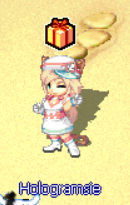 Hologramsie
Multi-Function Staff NPC
Hologramsie provides comprehensive services including:

Banking Services
Multipaged Bank, Galder Bank, and Timed Item Recharge

Equipment Enhancement
Repair, Refine, Compound, Temper, and Reset services

Pet Management
Training, Level-up, Synergize, and Hardant services

Fusion Services
Equipment and Pet visual customization and unfusion

Special Services
PyuPyu Exchange, Job Change, Fortune Reading, and more


